
The Retrieve data from URL flow block retrieves data from an online source for use in flows. The data's structure must match the structure of the data set used to store the data.
It is no longer possible to create or add the Retrieve data from URL flow block. Existing flows that use the Retrieve data from URL block still function, and Designers can edit the parameters of an existing block. However, when deleting an existing block and saving your changes, the system does not allow Designers to add a new Retrieve data from URL flow block. The system displays a notification about the deprecation of the Retrieve data from URL flow block.
We recommend using the Retrieve data with Http Connector to replace the Retrieve data from URL flow block.
Example:
Uploading XML files to a website
We have uploaded some XML files to a website.:
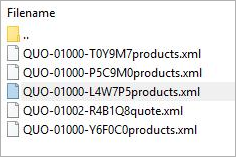
We can use the following URL to retrieve the XMLs from the website. The XML filenames contain the same quote IDs as the CRM, so they match.

HTTP field and value matching
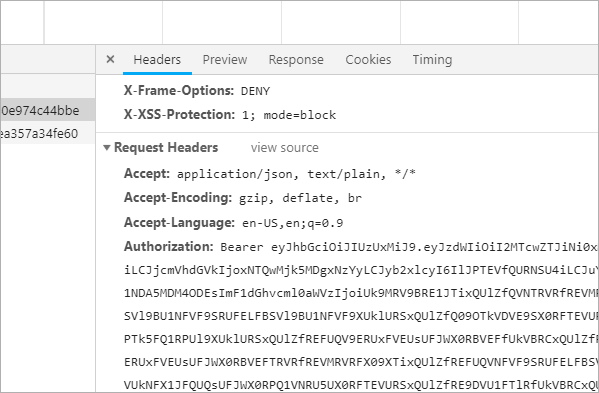
The HTTP field and value must be matching pairs as shown below. In this example, Accept is a field and application/json, text/plain, */* is the value.

Flow Block Parameters
The dropdown menus below provide all of the flow block's configuration options with detailed information and recommendations to help you configure your flow block.
Flow block customization buttons
You can further customize your flow block's parameters in several ways
-

-

-

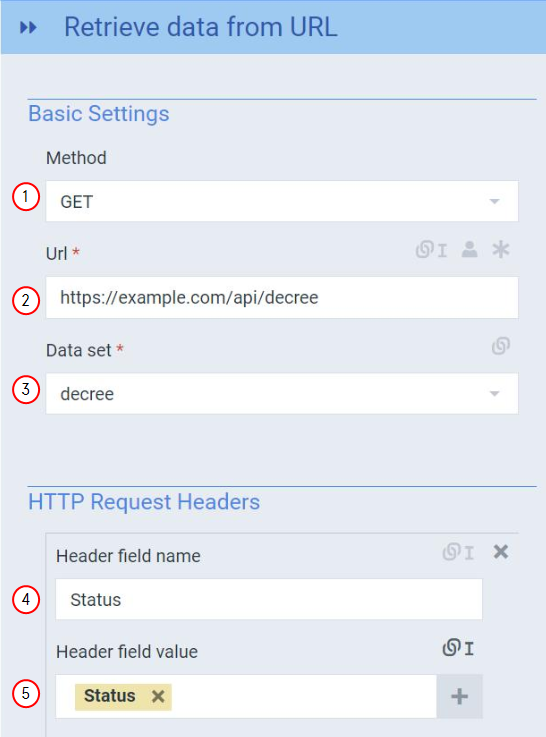
Basic settings and HTTP Request Headers
|
Index No. |
Field name |
Description |
|---|---|---|
|
1 |
Method |
Sets the HTTP method for the request with the following options: GET, POST |
|
2 |
URL |
Defines the URL the system uses to retrieve the data. |
|
3 |
Data set |
Specifies the data set to use when defining the data structure. |
|
4 |
Header field name |
When the method value is set to POST, the Post body field provides the body layout to send with the HTTP request. |
|
5 |
Header field value |
Defines the HTTP request headers. You can use the + button to supply multiple HTTP request headers, but each HTTP request must contain a name and a field value. |