
The Retrieve data flow block pulls data from your connector system. When you create a flow, the system automatically adds a Retrieve data flow block for every standard data set attached to the selected template. You can then link these Retrieve data flow blocks to your Generate Document flow block.
Only one record will be returned at any given time. If multiple records are found for a specified filter, the first one will be used.
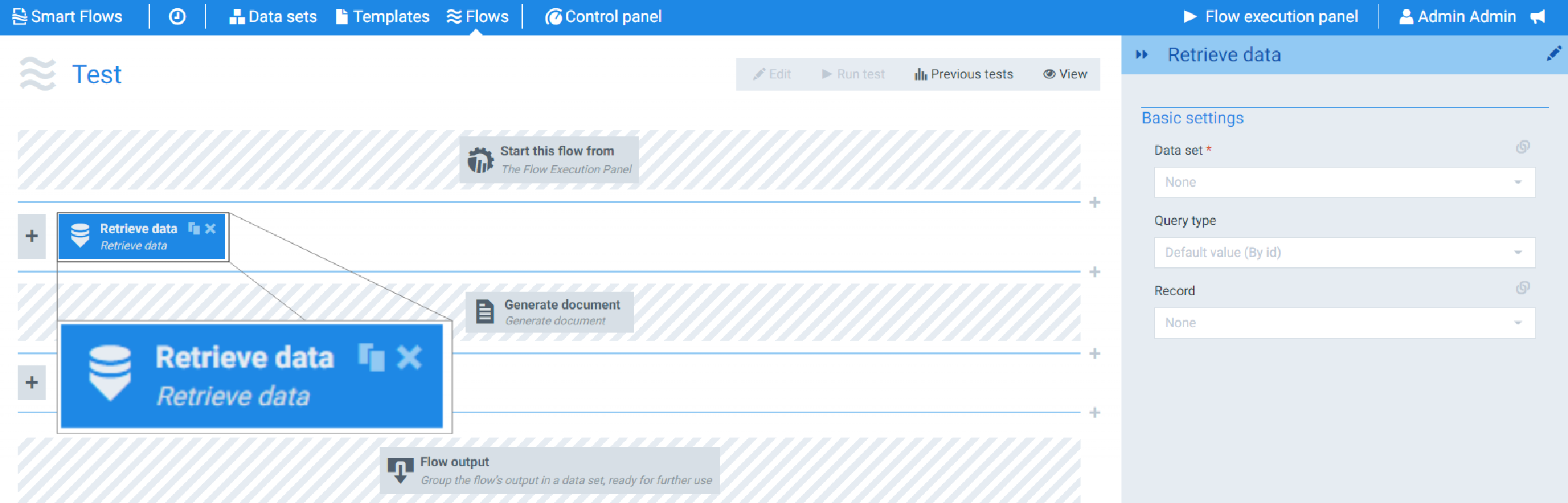
Flow Block Parameters
The dropdown menus below provide all of the flow block's configuration options with detailed information and recommendations to help you configure your flow block.
Flow block customization buttons
You can further customize your flow block's parameters in several ways
-

-

-

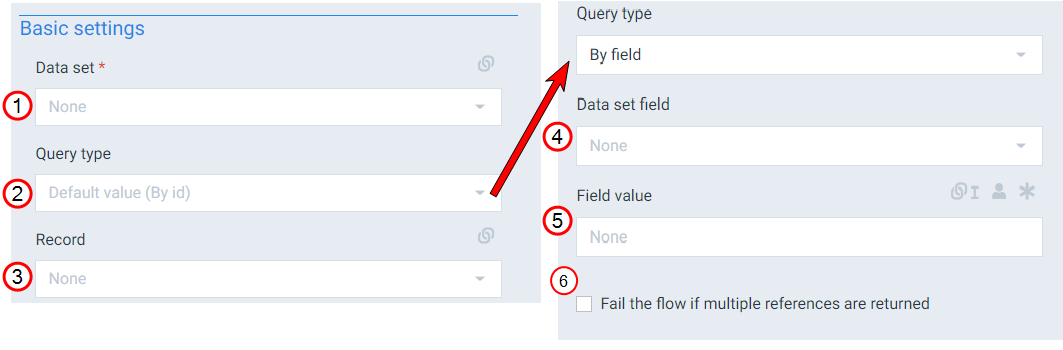
Basic settings
|
Index No. |
Field name |
Description |
|---|---|---|
|
1 |
Data set |
Defines the data set to use for structuring the data. Every Generate document flow block requires one Retrieve data flow block. If you are adding additional Generate document and Retrieve data flow blocks, we recommend using matching data sets on your Generate document and Retrieve data flow blocks. The Generate document flow block data set is set by the system when you create the template and the flow. |
|
2 |
Query type |
Sets how flow block pulls data from your CRM with the following options: By id The system uses the id of the selected record to query the data.(Default), By field You select the field and provide a value for query to use when searching. When this option is selected, you can also decide if the flow fails when the query returns multiple references.. Only one record will be returned at any given time. If multiple records are found for a specified filter, the first one will be used. |
|
3 |
Record |
Defines the record to pull data from within the data set. This setting is only available when the query type is By id The system uses the id of the selected record to query the data.. The selected record is automatically linked to the Start this flow from the flow block after you create the flow. The selected record is a field in the data set that allows for different uses. Select to display example - You could use the User field from your data set to get the current user's data. |
|
4 |
Data set field |
Defines the data set field to use when querying data. This setting is only available when the Query type is "By field." |
|
5 |
Field value |
Defines the value the system should use for your selected field when querying data. This setting is only available when the Query type is 'By field'. |
|
6 |
Fail the flow if multiple references are returned |
When checked, the flow fails if multiple references are returned from the query. When not checked, only the first record returned by the query is considered. This setting is only available when the Query type is 'By id. |