
The E-mail (SMTP) flow block allows designers to send e-mails from a Simple Mail Transfer Protocol (SMTP) server. When sending e-mails you have the option to attach documents created during the flow or assets from your project.
Most SMTP servers have a file size limit of 10 MB for attachments.
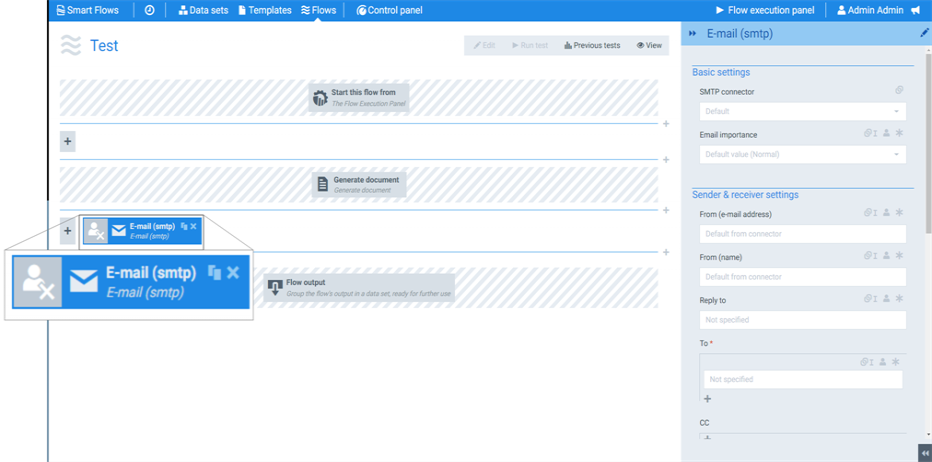
Flow Block Parameters
The dropdown menus below provide all of the flow block's configuration options with detailed information and recommendations to help you configure your flow block.
Flow block customization buttons
You can further customize your flow block's parameters in several ways
-

-

-

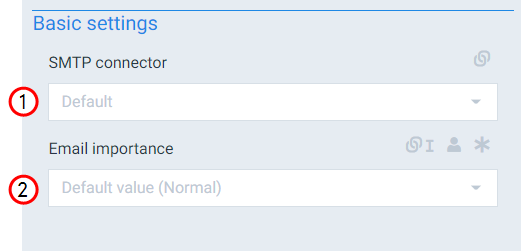
Basic settings
|
Index No. |
Field name |
Description |
|---|---|---|
|
1 |
SMTP connector |
Defines the SMTP connector to use. If you only have one applicable connector, the system uses that connector by default. |
|
2 |
Mail importance |
Sets the priority of the created email with the following options: high, normal or low. |
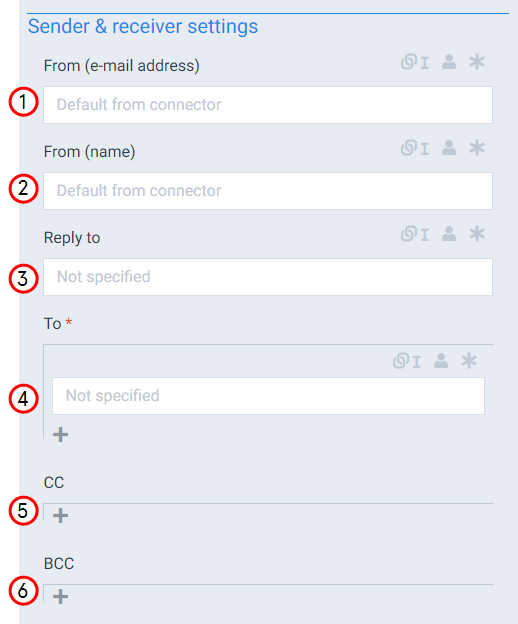
Sender & receiver settings
|
Index No. |
Field name |
Description |
|---|---|---|
|
1 |
From (e-mail address) |
Sets who the e-mail appears to come from for the receiver. If you don't specify an address, the system uses the e-mail address specified during the connector set up. |
|
2 |
From (name) |
Sets name to display name for the From field of the e-mail. |
|
3 |
Reply to |
Sets the automatic e-mail for receiver to reply to when the user responds to the e-mail. |
|
4 |
To |
Sets the e-mail addresses to add to the To field of the e-mail. If you are manually typing into the field, ensure the addresses are separated by the a semicolon(;). Multiple recipients can be selected dynamically by converting this setting to a linked field and using the E-mail field for 1:N relation from your data set. |
|
5 |
CC |
Sets the e-mail addresses to add to the CC field of the e-mail. Multiple recipients can be selected dynamically by converting this setting to a linked field and using the E-mail field for 1:N relation from your data set. |
|
6 |
BCC |
Sets the e-mail addresses to add to the BCC field of the e-mail. Multiple recipients can be selected dynamically by converting this setting to a linked field and using the E-mail field for 1:N relation from your data set. |
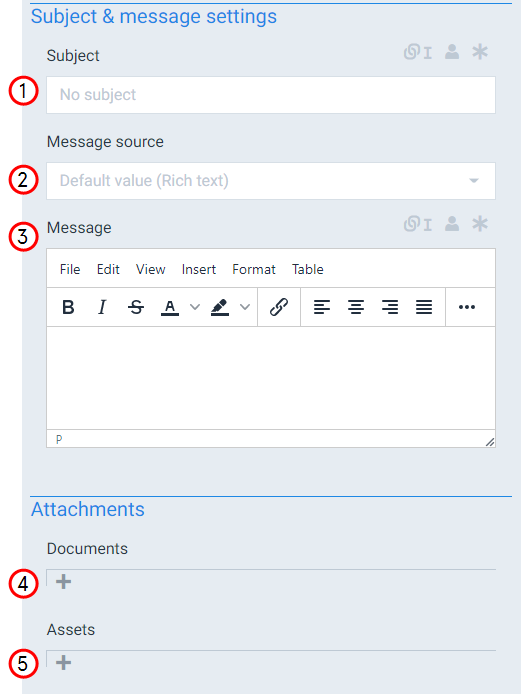
Subject & message settings
|
Index No. |
Field name |
Description |
|---|---|---|
|
1 |
Subject |
The Subject field allows users to replace the default Docusign email subject. |
|
2 |
Message source |
Defines the source of the message content with the following options: Rich text The system uses the text you enter into the message source field. , Document Uses a generated document from within the current flow. , Template Uses the message source set by the template. |
|
3 |
Message |
Fills in the body of the e-mail. |
|
4 |
Documents |
Defines which documents created during the flow to attach to the e-mail. |
|
5 |
Assets |
Sets the preexisting assets not created during the flow to attach to the e-mail. |