
Microsoft Dynamics 365 allows image storage, such as a company logo for a contact. These images may be linked to the contact with a URL. This field option is typically located in the database OOTB (Out of the Box) tables. The naming for the image field is "entityimage_url".
Note: Microsoft has recently added support for an image field within Dynamics. Users with the Dynamics API 9.1 are able to use the images from Dynamics 365 as a URL image file in both Data Sets and Template Builder. Users who are not currently using the Dynamics API 9.1 must reconfigure their Dynamics 365 connector and switch to the 9.1 API, refer to Experlogix App for Microsoft Dynamics 365 CE. Microsoft Power Apps is built into Dynamics 365, you must be update your setting to Enable Image Storage in Power Apps.
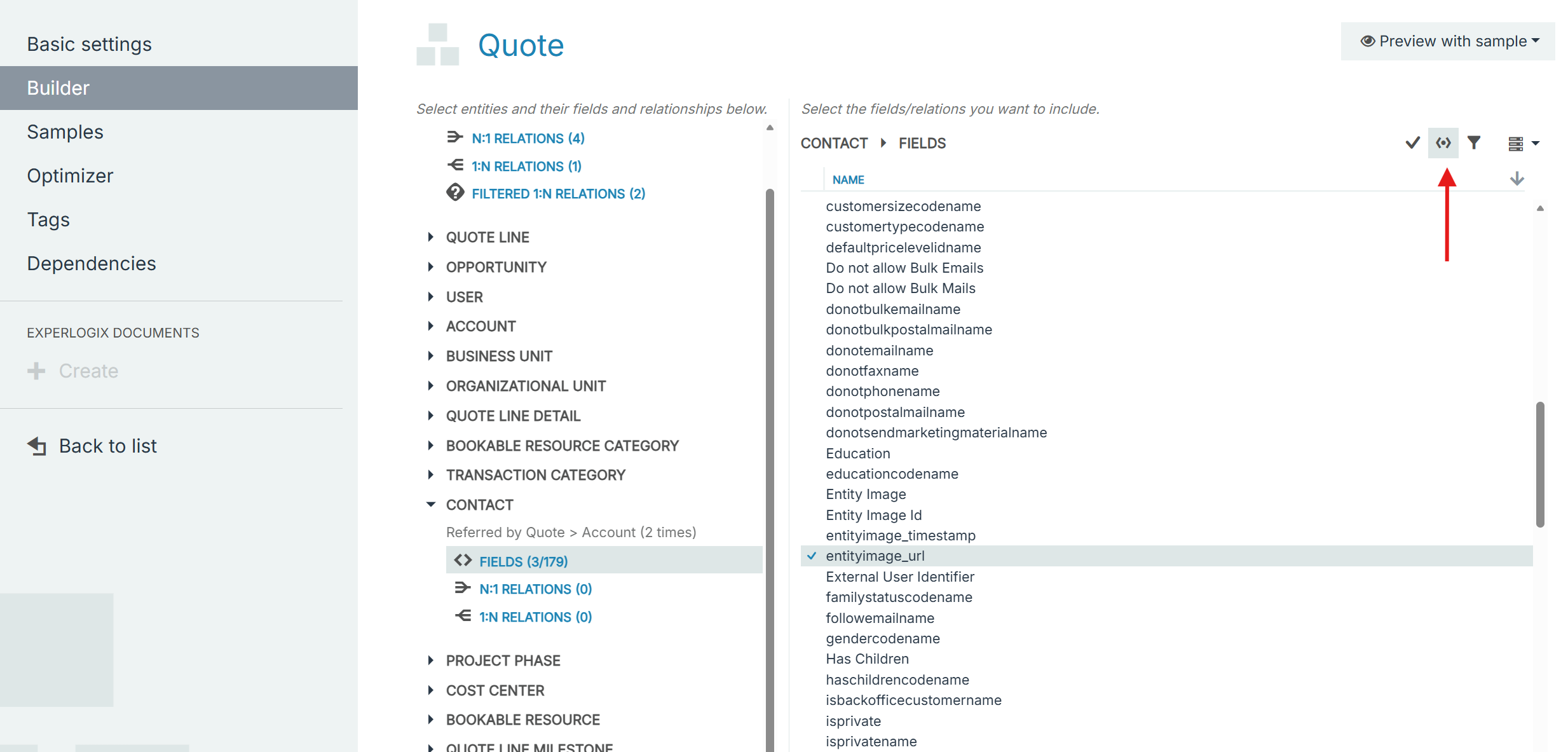
-
Go to Project Console > Data sets.
-
Select a Data set from the list.
-
In the Data Set Builder, select the entity where you want to add
entityimage_url, to expand its available fields and relationships. -
Select Fields.
On the right, the fields associated with the entity display. -
Select the Show advanced fields button.
Note: Advanced fields are additional fields and not guaranteed to be retrievable.
-
Select the entityimage_url option.
A checkmark appears next to the entityimage_url advanced field. -
Select Save Changes.