
eInvoicing is becoming a standard requirement for organizations operating across regulated markets worldwide. This page explains what eInvoicing is, why it matters, and outlines the most common scenarios for generating compliant eInvoices using Experlogix Smart Flows.
What is eInvoicing and why is it relevant?
Electronic invoicing (“eInvoicing”) refers to the creation, transmission, and reception of invoices in structured, machine‑readable data formats rather than just as visual PDFs. In recent years, eInvoicing initiatives and even regulations have rapidly gained momentum worldwide.
European Union: Under Directive 2014/55/EU, B2G eInvoicing is mandatory across member states, with many countries extending requirements to B2B transactions (e.g. Italy, France, Poland, Belgium).
India: Implemented eInvoice requirements for GST compliance for businesses above certain turnover thresholds.
Mexico: Enforces CFDI (Comprobante Fiscal Digital por Internet) as a mandatory electronic invoicing standard.
Brazil: Requires electronic fiscal documents (NF-e) for most transactions.
Singapore & Australia: Promoting PEPPOL-based eInvoicing networks for cross-border interoperability.
Check eInvoicing Features - License and Release Dates to verify if your Experlogix Smart Flows version and license supports all features mentioned in this tutorial.
Common eInvoicing Flows
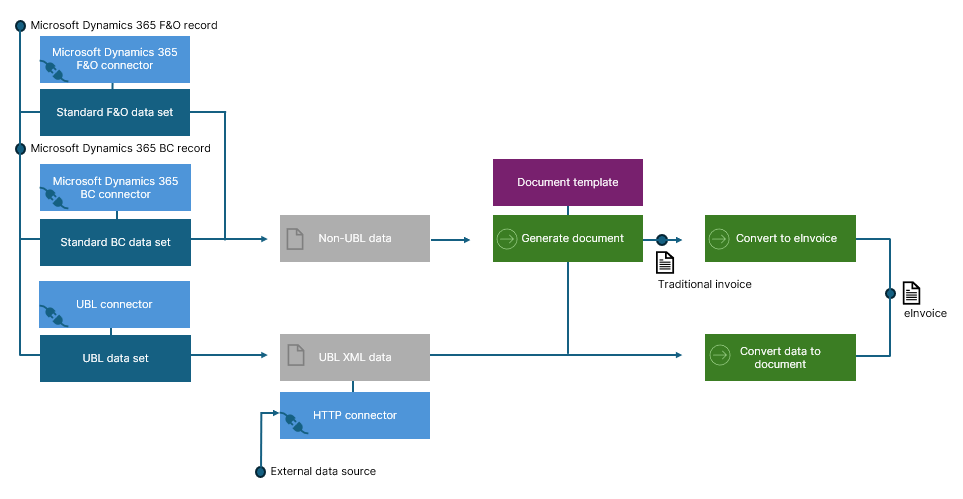
What follows describes three common patterns for generating compliant eInvoices with Experlogix Smart Flows. Each flow results in an eInvoice-compliant file (such as PEPPOL BIS 3.0 or ZUGFeRD) that can be delivered according to the requirements of the receiving party.
The three flows differ in where they start and how structured eInvoice data and traditional invoice documents are combined:
Record-driven flow – starts from an ERP record and retrieves eInvoice-compliant UBL data from the ERP system.
Data-driven flow – starts from already-available eInvoice-compliant XML data produced by an external system.
Mixed flow – starts from structured XML data and additionally retrieves ERP or CRM data to generate a traditional invoice document.
Together, these flows cover the most common enterprise eInvoicing scenarios and allow organizations to flexibly align with regulatory, technical, and business requirements.
Conditional eInvoicing - one flow for multiple trading-partner requirements
Managing different trading-partner invoicing requirements does not require separate flows or complex customizations. With Experlogix Smart Flows, you can build one configurable flow that dynamically adapts to each partner’s eInvoicing needs using simple, data-driven conditions.
The reality of global invoicing requirements
In practice, most organizations do not deal with a single invoicing standard. Customers and trading partners may have very different requirements depending on country, regulation, and system maturity:
-
A customer in Germany may require a ZUGFeRD invoice (PDF with embedded XML).
-
A customer in Belgium may require a PEPPOL BIS 3.0 invoice.
-
Another customer may have no eInvoicing capability at all and only accept a classic PDF invoice.
This brings up a common question: Is it possible to create a single flow that manages all these scenarios without duplicating logic or relying on custom code? The answer is yes.
With Experlogix Smart Flows, you can build a single flow with conditional branching that dynamically adapts its behavior based on the invoicing requirements of each trading partner without writing any code. The key is to store invoicing preferences directly in your ERP or CRM system and use those values to drive decisions in the flow.
Capturing trading-partner invoicing preferences in your ERP or CRM
A simple approach is often sufficient. For example, on the customer or vendor record in your ERP or CRM system, define a field such as Invoicing method with a small set of options:
-
Classic – no eInvoicing; generate and deliver a traditional PDF invoice
-
PEPPOL – generate a PEPPOL-compliant eInvoice (XML with embedded human-readable document)
-
ZUGFeRD – generate a ZUGFeRD-compliant hybrid PDF
This field can be implemented as a simple dropdown and maintained by business users. It isn’t hard to imagine additional preference capturing fields for delivery methods like email, hot folder drop or print, or for storage and archiving.
Using conditional logic in Smart Flows
When building your invoice flows in Flow Bilder you can use captured preferences to drive conditional branches in the flow definition using Condition flow blocks. When the flow runs, Smart Flows reads the invoicing preference from the ERP or CRM record and uses the values to follow the corresponding branch, for example:
-
If Invoicing method = Classic → generate and deliver a PDF invoice only
-
If Invoicing method = PEPPOL → retrieve or reuse UBL data and use Convert to eInvoice to inject the PDF into the eInvoice XML
-
If Invoicing method = ZUGFeRD → attach the XML to the PDF using Convert to eInvoice
Similarly conditions downstream can drive delivery and storage based on captured preferences.
Using Experlogix Smart Flows, your organization can respond to this reality without disrupting existing invoicing processes or introducing complex custom development.
By supporting record-driven, data-driven, mixed, and conditionally branched flows, Smart Flows enables you to generate the right invoice format for every trading partner, from classic PDFs to PEPPOL and ZUGFeRD eInvoices, all within a single, configurable automation framework. This allows your business to stay compliant, flexible, and future-proof as eInvoicing requirements continue to evolve worldwide.
Configure connected systems of record for eInvoicing
This section explains how to configure systems of record connected with Experlogix Smart Flows to output eInvoice-compliant XML data, a prerequisite for record-driven eInvoicing flows. Instead of duplicating the connected system's documentation, we refer you to vendor resources to ensure you access their latest updates on this topic.
Microsoft Dynamics 365 Finance & Operations
Vendor Documentation
-
Supported Standards for electronic invoicing in Europe - Microsoft Dynamics 365 Finance & Operations
-
Electronic reporting overview - Microsoft Dynamics 365 Finance & Operations
Non-vendor Documentation
Configure a UBL Connector in Smart Flows
The UBL Connector supports creation and processing of standardized Universal Business Language data sets, enabling Smart Flows to process invoice/credit‑note data or other UBL-schema compliant data from connected systems that can export UBL (e.g. PEPPOL BIS 3.0) formats.
UBL Connector Setup
Create a UBL Connector via the Control Panel of your Experlogix Smart Flows project.
-
Project Console > Control Panel > Connectors > Create
-
Create a new connector of type UBL, select the version of UBL your connector should support.
To have access to this functionality, the UBL plugin must be activated in your license. Reach out to our support team if you don’t see the UBL connector type listed in the Connector create modal.
UBL Data Set Creation
Once the connector is in place, you can create data sets of type UBL. These data sets have a preset schema, but they can be reduced (less fields and/or relationships). In a typical eInvoicing scenario you would create and manage invoice and credit note data sets of type UBL.
-
Project Console > Data Sets > Create, to create a UBL data set of type invoice or credit note
-
Reduce the data set to match your use case in Data Set Builder. Remove and re-add fields and relationships as you see fit.
The idea behind UBL is to define an open, standardized XML format to enable automated exchange of business documents like invoices and purchase orders between systems. While you can reduce a UBL data set by omitting fields and relationships, you cannot add new fields or relationships without breaking compliance.
eInvoicing Features - License and Release Dates
|
Feature |
Version |
Release Date |
Licensing |
|---|---|---|---|
|
Convert data to file flow block |
4.25+ |
September 2025 |
Included in all licenses |
|
Convert to eInvoice flow block supporting ZUGFeRD |
4.25+ |
September 2025 |
Included in all licenses |
|
Convert to eInvoice flow block supporting PEPPOL |
4.27+ |
Expected February 2026 |
Included in all licenses |
|
UBL connector, UBL data sets |
4.27+ |
Expected February 2026 |
Requires UBL Plugin license |
|
Retrieve UBL Data flow block for Microsoft Dynamics 365 F&O |
4.27+ |
Expected February 2026 |
Requires UBL Plugin licenseMicrosoft Dynamics 365 F&O Plugin license |
|
Retrieve UBL Data flow block for Microsoft Dynamics 365 BC |
4.28+ |
To be announced |
Requires UBL Plugin licenseMicrosoft Dynamics 365 BC Plugin license |
|
Microsoft Dynamics 365 F&O connector, Microsoft Dynamics 365 F&O data sets |
4.14+ |
July 2022 |
Requires Microsoft Dynamics 365 F&O Plugin license |
|
Microsoft Dynamics 365 BC connector, Microsoft Dynamics 365 BC data sets |
4.25+ |
September 2025 |
Requires Microsoft Dynamics 365 BC Plugin license |